Median, Mean, Mode and Range from a Frequency Table
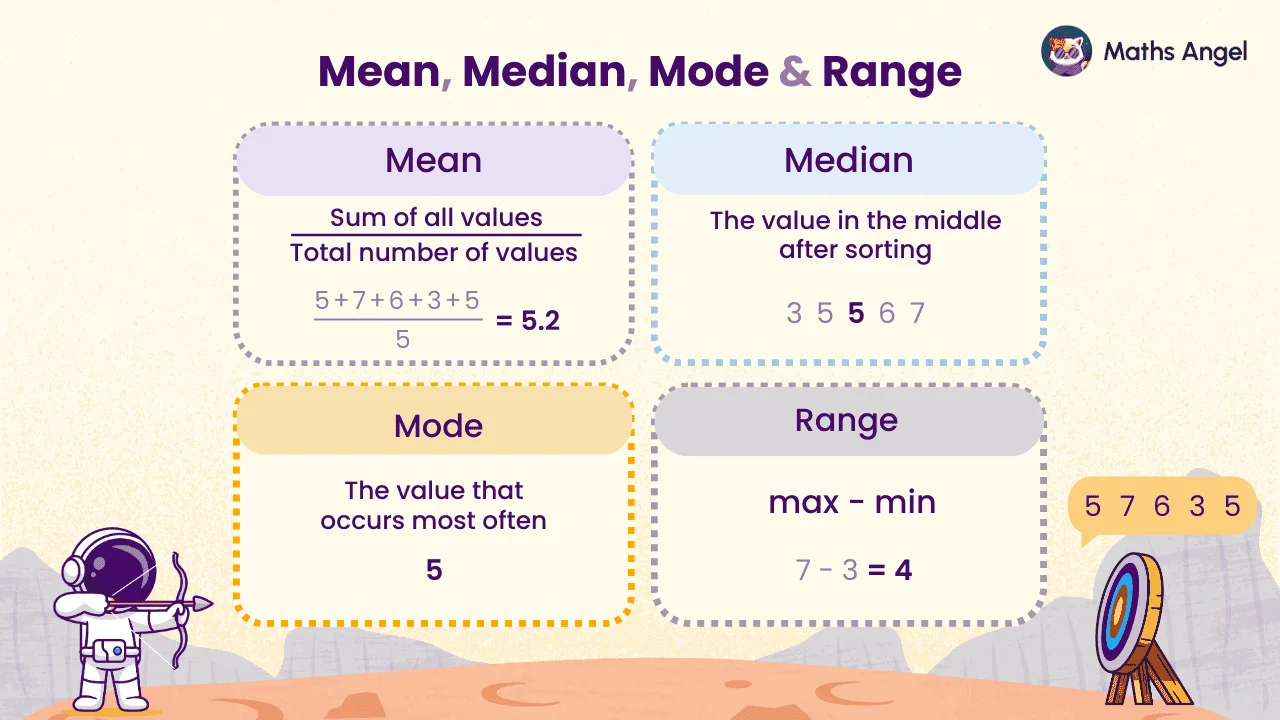
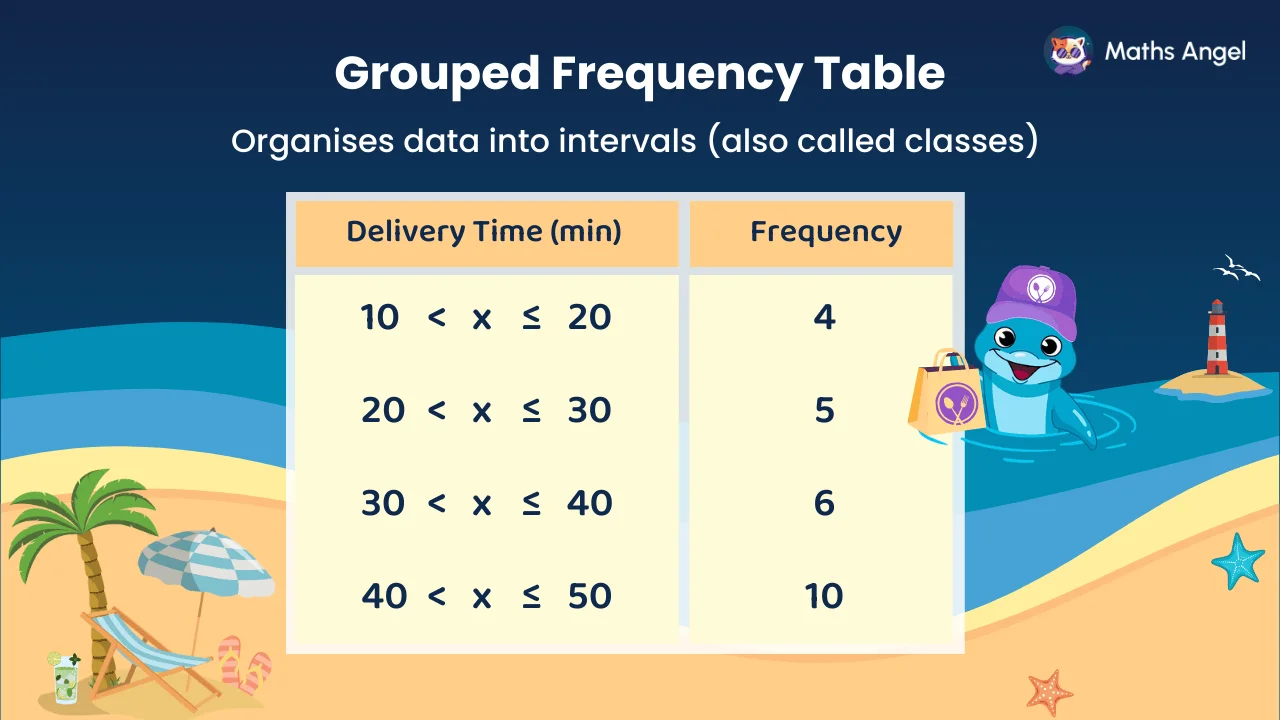
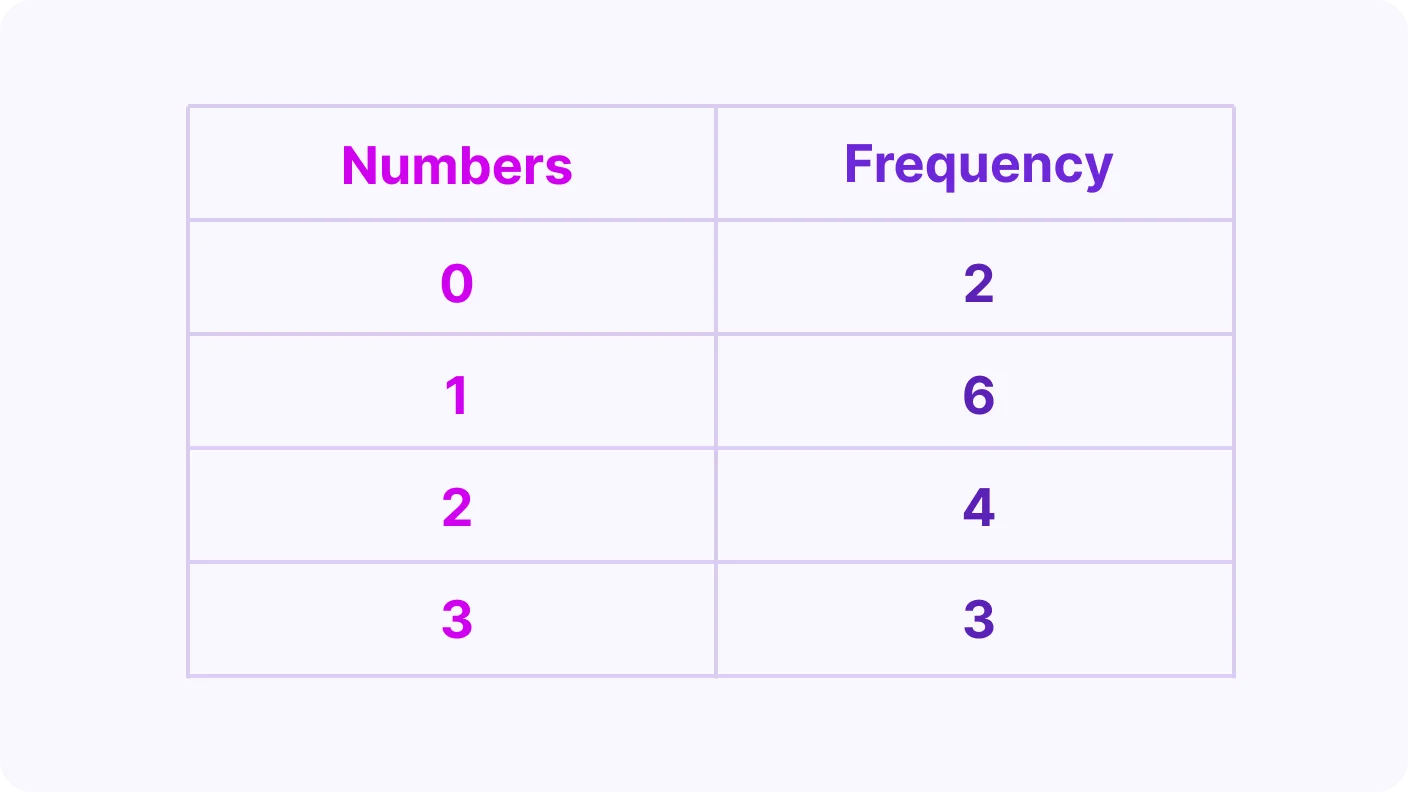
A frequency table shows how often each value appears. To find the mean, multiply each value by its frequency, add the results, then divide by the total frequency. The mode is the value with the highest frequency, and the median sits at position (n + 1) ÷ 2.
Video Lesson
Watch and learn the basics
🎬 Did this video explain it clearly?
Flashcards
Review key concepts visually
%20Mean%20from%20a%20frequency%20table.webp)
%20Median%20from%20a%20frequency%20table.webp)
%20Mode%20and%20Range%20from%20a%20frequency%20table.webp)
%20Overview%20Mean%2C%20Median%2C%20Mode%2C%20Range%20from%20Frequency%20Table.webp)
Mean from a Frequency Table
- Multiply each value by its frequency and add the results.
- Divide by the total frequency to find the mean.
Median from a Frequency Table
- Add the frequencies to find the total number of values (n).
- Use (n + 1) ÷ 2 to find the median position.
- Example: if , , so the 8th value is the median.
Range from a Frequency Table
- The range is the largest value minus the smallest value.
- Exam tip: do not use frequencies, only use the values.
Mode from a Frequency Table
- The mode is the value that appears the most often.
- It is the value with the highest frequency.
Practice Questions
Test your understanding
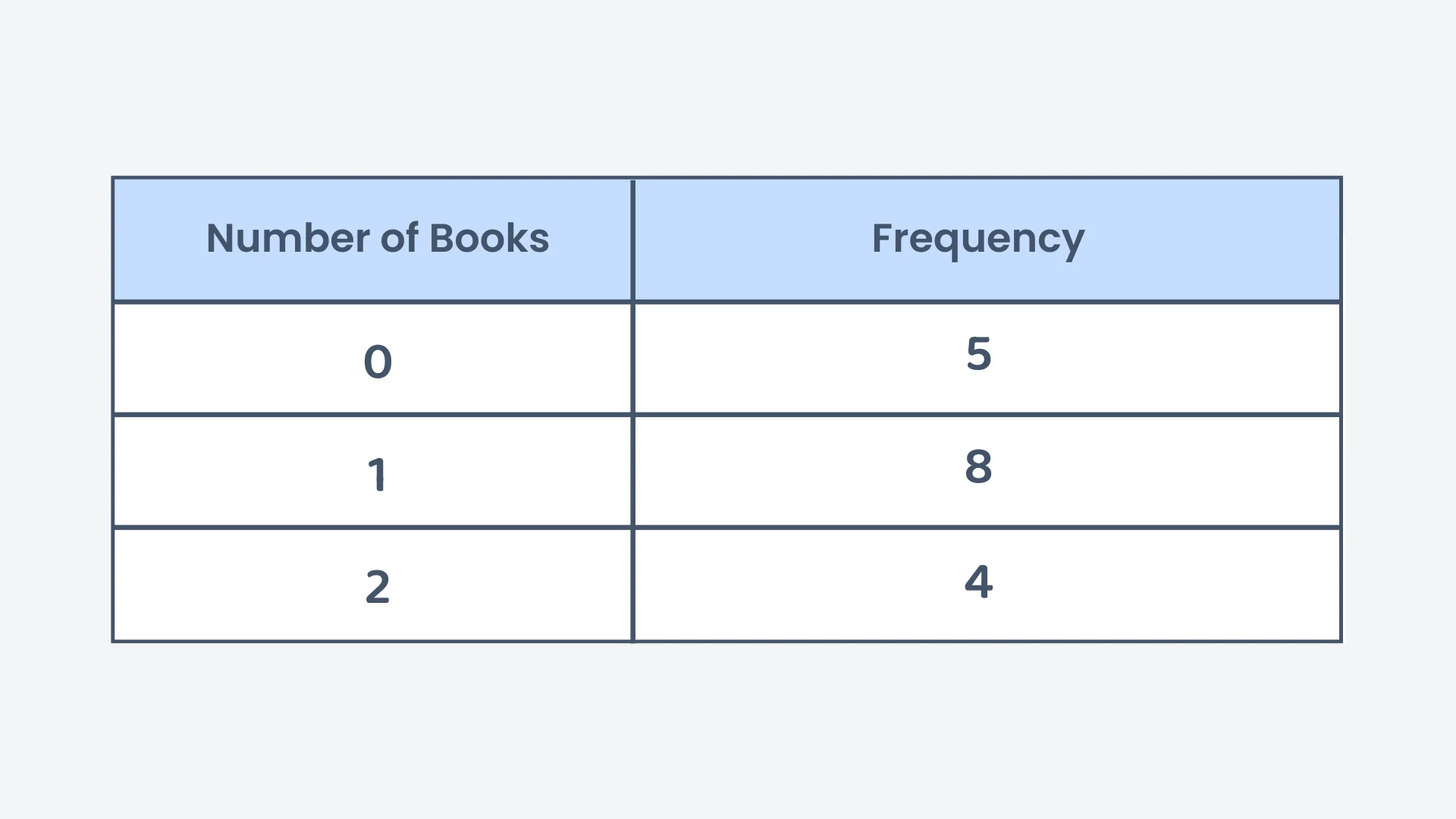
The frequency table below shows the number of books read by students. What is the mode of the data?
Correct! 🎉 +10 pointsCorrect! 🎉 Worth 10 XPNot quite right
The mode is the value that occurs most often, so look down the frequency column for the largest frequency.
The frequencies are 5, 8 and 4. The largest is 8, and it sits in the row for 1 book.
So the mode is 1 book. Be careful: 8 is how many students, not the mode itself.
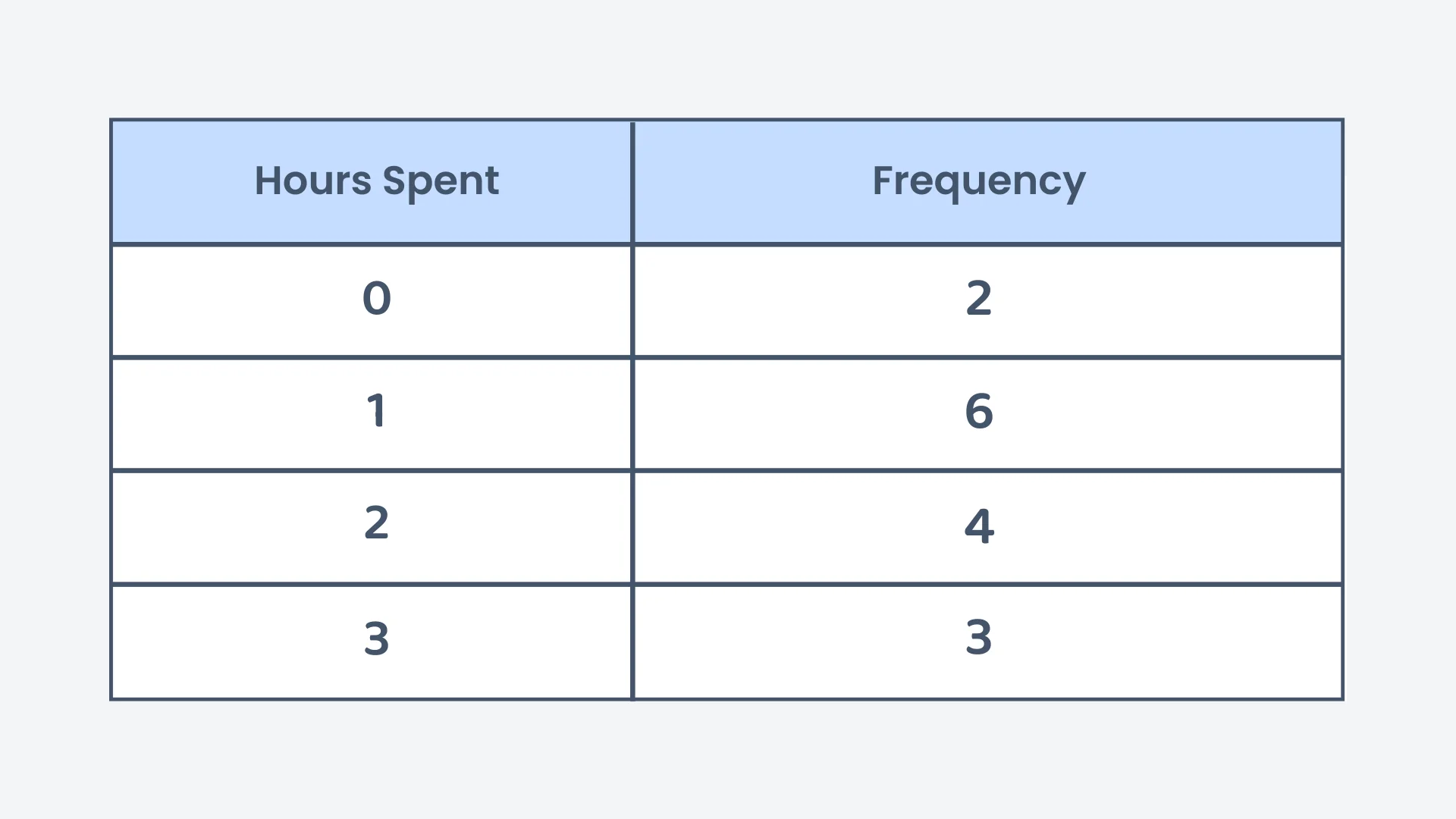
The table below shows the number of hours students spend on homework. What is the range of the data?
Correct! 🎉 +10 pointsCorrect! 🎉 Worth 10 XPNot quite right
The range is a single number: the largest data value minus the smallest.
The data values are the numbers of hours: 0, 1, 2 and 3, not the frequencies beside them.
The largest is 3 and the smallest is 0, so the range is hours. A value of 0 hours still counts as a data value.
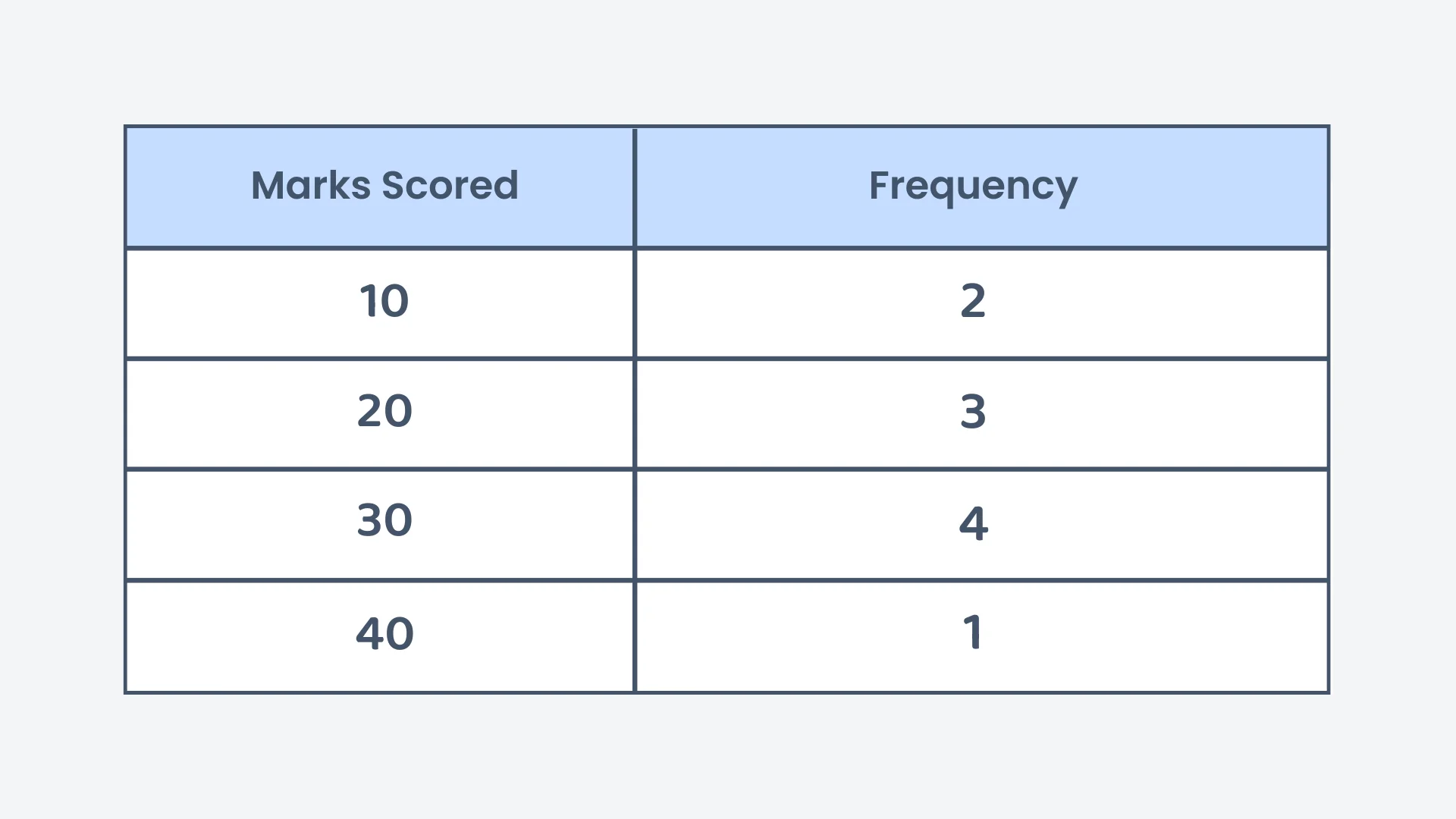
The table below shows the marks scored by students in a quiz. What is the mean mark?
Correct! 🎉 +20 pointsCorrect! 🎉 Worth 20 XPNot quite right
Multiply each mark by its frequency and add the results: .
The total frequency is students, so the mean is 24.
The 240 is only halfway. It still has to be shared out, and it is divided by the total frequency (10 students), not by the 4 rows of the table. Note that 25 is the median mark here, which is a different average.
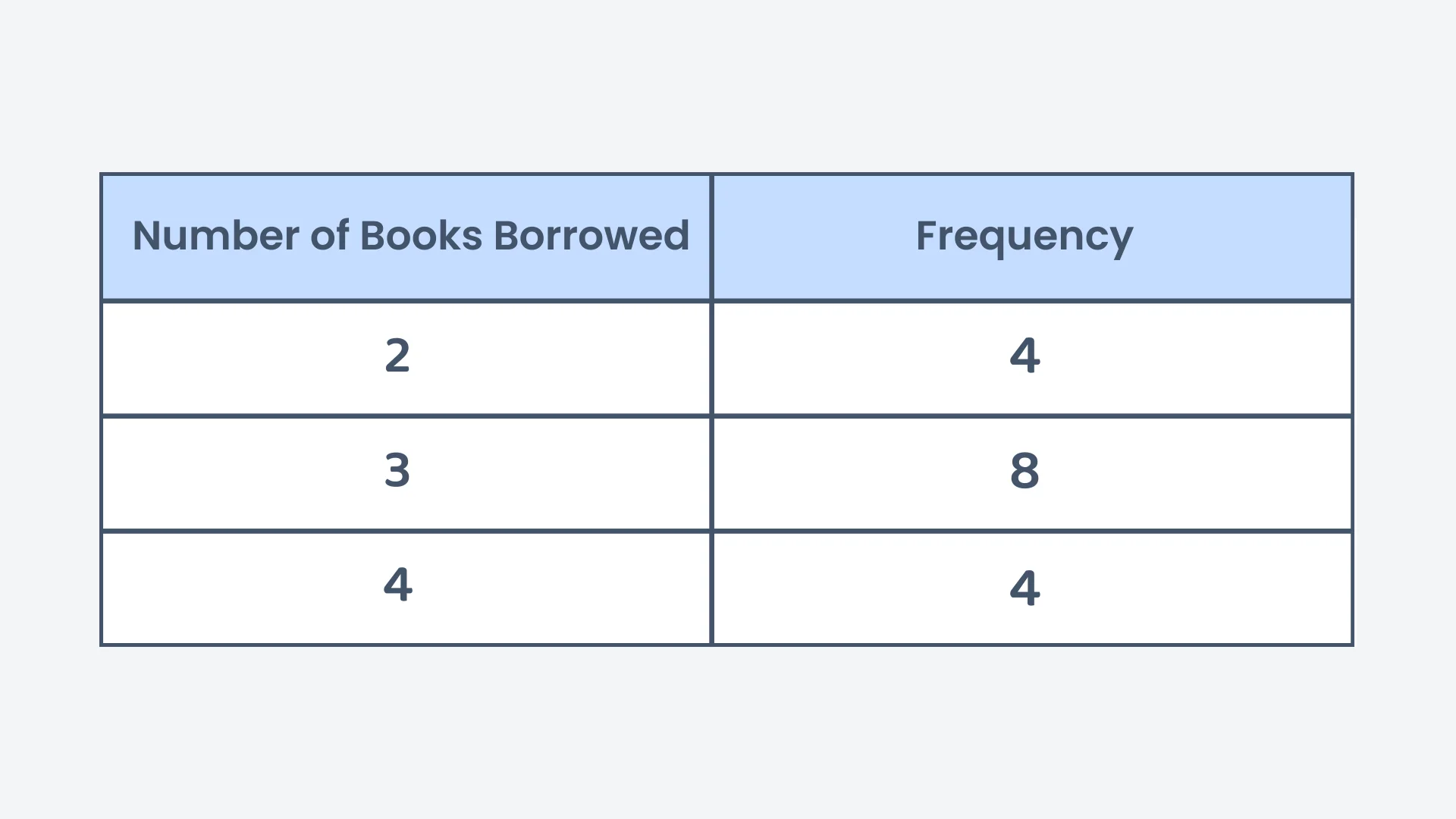
The table below shows the number of books borrowed by students from a library. What is the mean number of books borrowed?
Correct! 🎉 +20 pointsCorrect! 🎉 Worth 20 XPNot quite right
Multiply each number of books by its frequency and add the results: books in total.
The total frequency is students, so the mean is 3 books.
The 48 is the total, not the mean. It still has to be divided, and by the 16 students rather than by the 3 rows of the table.
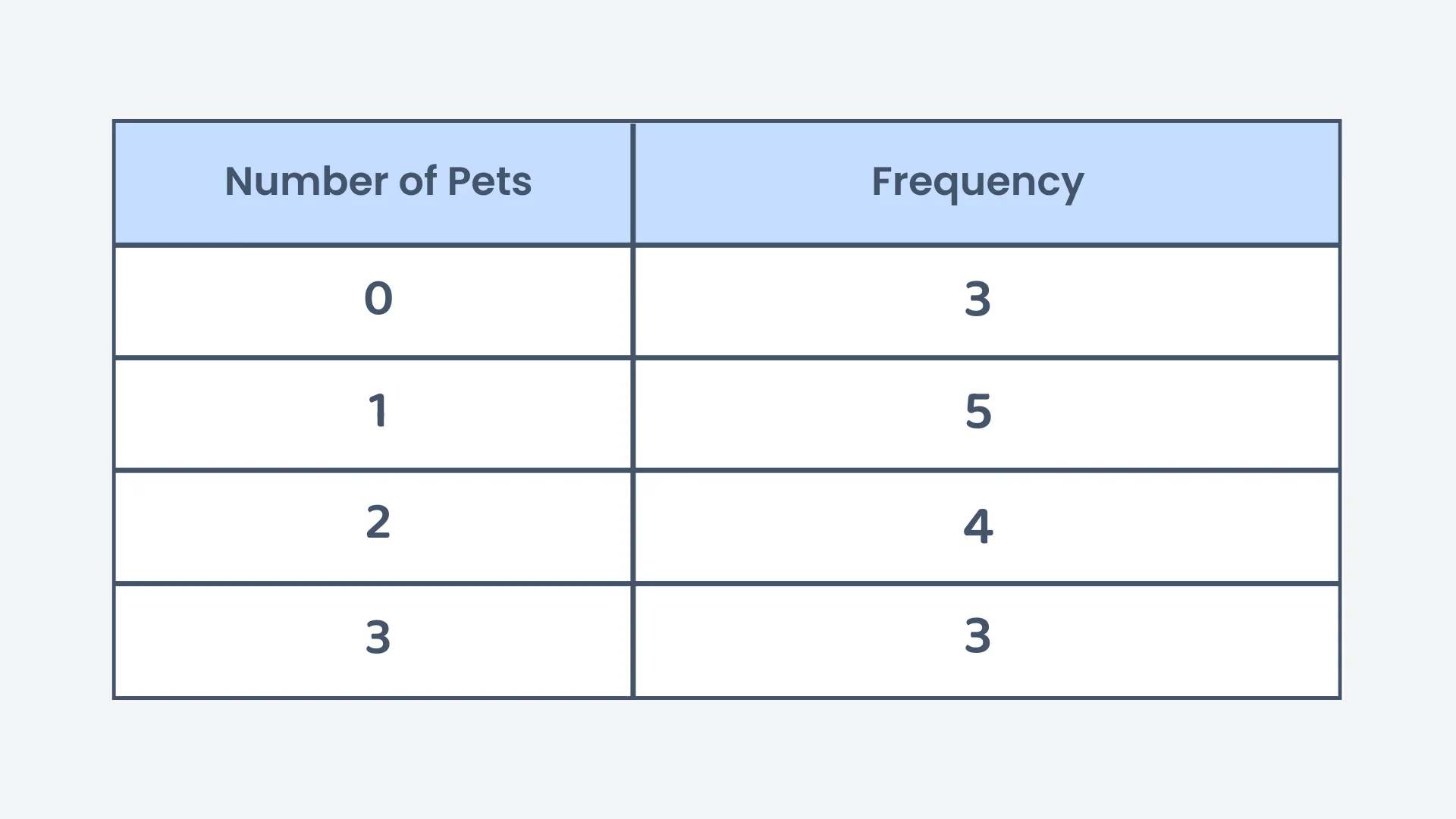
The table below shows the number of pets owned by students. What is the median of the data?
Correct! 🎉 +20 pointsCorrect! 🎉 Worth 20 XPNot quite right
The total frequency is students, so the median is the 8th value.
Build up the frequencies in order: values 1 to 3 are 0 pets, and values 4 to 8 are 1 pet. The 8th value is therefore 1.
The median is the value sitting at that position, not the position number itself, so the median is 1 pet.
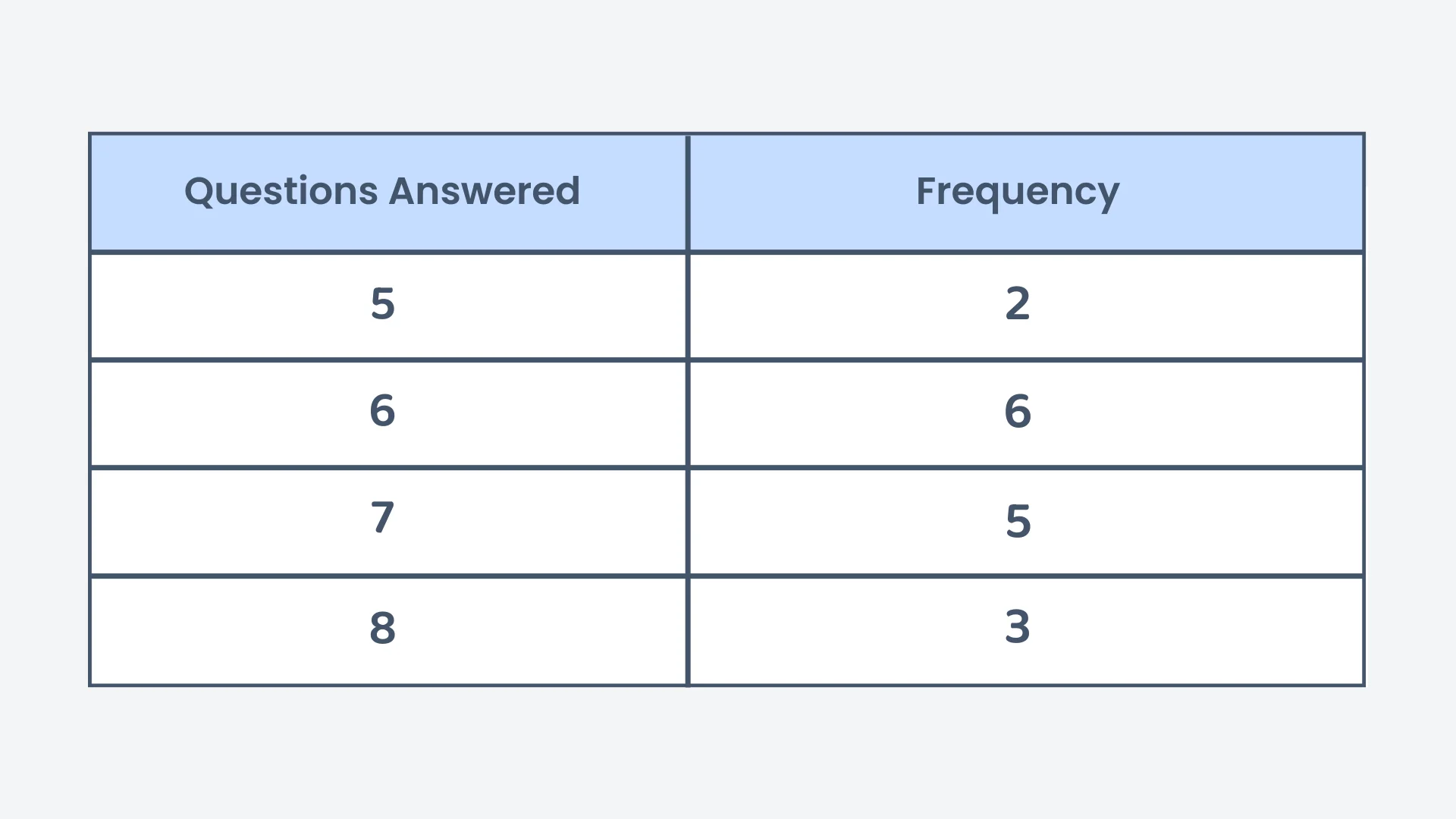
The table below shows the number of questions answered by students in a quiz. What is the median number of questions answered?
Correct! 🎉 +30 pointsCorrect! 🎉 Worth 30 XPNot quite right
The total frequency is students. Since 16 is even, the median is halfway between the 8th and 9th values.
Build up the frequencies in order: values 1 to 2 are 5, values 3 to 8 are 6, and values 9 to 13 are 7. So the 8th value is 6 and the 9th value is 7.
6.5 questions.
Want to see the full working?
Interactive Activity
Explore Mean, Median, Mode & Range from a Frequency Table
Loading interactive widget...
Frequently asked questions
The questions students bump into most on this topic
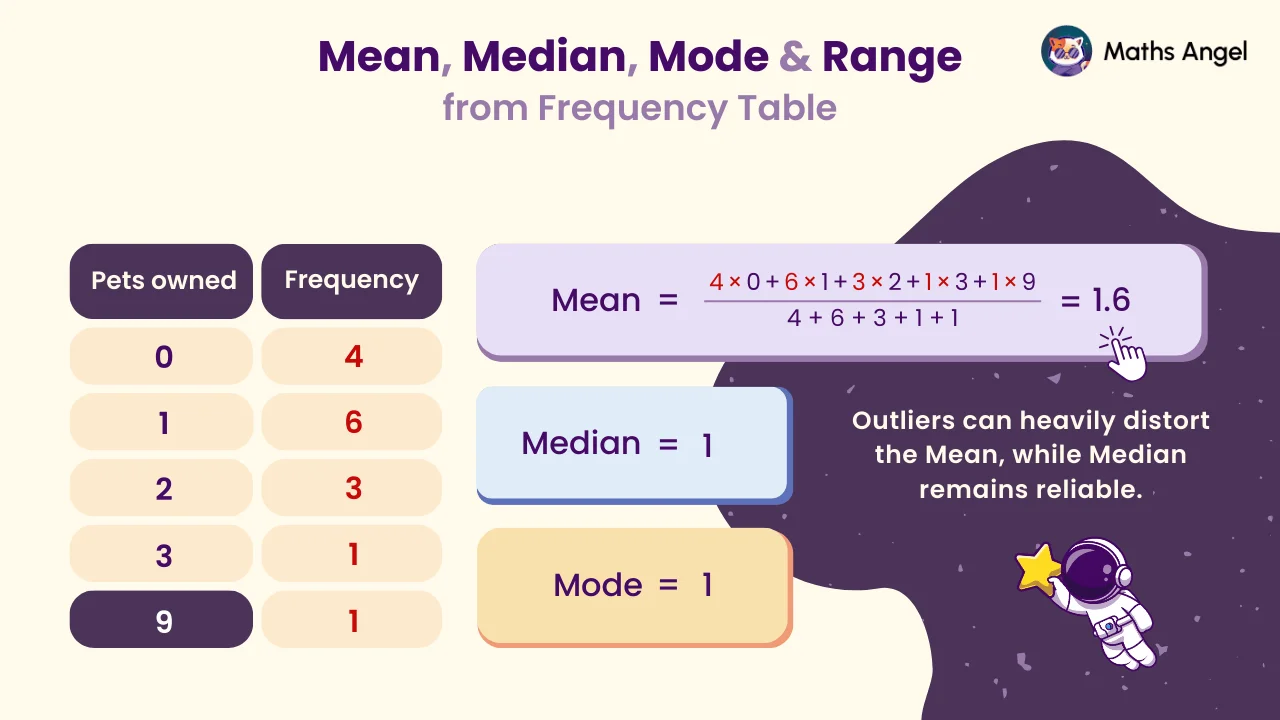
A frequency table lists each value in a data set next to its frequency, which is how many times it appears. For example, a table of pets owned by 15 pupils shows that 4 pupils own 0 pets, 6 own 1 pet, 3 own 2 pets, and so on. Adding the frequency column gives the total number of values, here 15.
Multiply each value by its frequency and add the results. That gives the total of all the values without listing them one by one. Then divide by the total frequency, the number of values. In the pets table the values add up to 24 and the total frequency is 15, so the mean is 24 ÷ 15 = 1.6 pets per pupil.
Add the frequencies to find the total number of values, n. The median sits at position (n + 1) ÷ 2 once the values are in order, and a frequency table already is. With 15 pupils, (15 + 1) ÷ 2 = 8, so the median is the 8th value: the first 4 values are 0 and the next 6 are 1, so it is 1.
The mode is the value with the highest frequency: in the pets table, 1 pet has frequency 6, so the mode is 1. The range is the largest value minus the smallest value, using the values and not the frequencies: 9 − 0 = 9. A common exam mistake is to subtract frequencies instead of values.
Use the frequency column three ways. Mean: multiply each value by its frequency, add, then divide by the total frequency. Median: find the position (n + 1) ÷ 2 and count down the frequencies to it. Mode: the value with the highest frequency. In the pets table that gives a mean of 1.6, a median of 1 and a mode of 1.
The mean is the total of the values divided by how many there are. The median is the middle value when they are in order. They can differ a lot: in the pets data one pupil owns 9 pets, which pulls the mean up to 1.6 while the median stays at 1. An outlier moves the mean but barely moves the median.
What's next?
Found this one hard? Go one step back first. Feeling confident? Carry on to the next lesson.